The edoc document reader app reads already digitized documents, e.g. invoices, and prepares the required properties of the document.
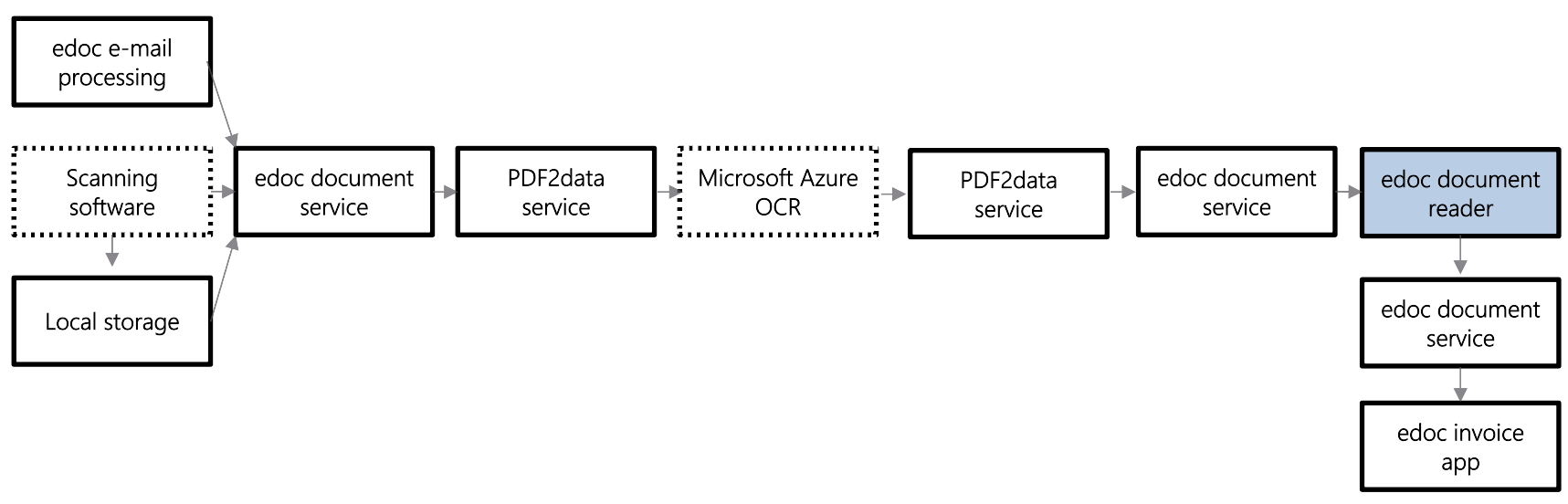
In this article, we present the individual process steps regarding the software components involved in the digitization process from receipt of the document to recognition and display in the edoc app.
Using the example of an invoice that either reaches you by e-mail or is sent to you on paper, you will learn about the processing and preparation process.
-
Incoming documents in variable format: You receive an invoice. The way and format (paper, PDF, ZUGFeRD, XRechnung, etc.) in which the invoice is received is irrelevant for edoc document reader. There are various input scenarios, such as scanning software, edoc e-mail processing or local file storage.
-
Virtual storage location for processing: All digitized invoices are stored in edoc documents, regardless of the invoice input channel.
-
Prepare the processing in the Azure cloud: If you have configured the reading of the invoice by edoc document reader in the edoc invoice administration, edoc PDF2Data service becomes active. This service transfers the PDF document to the Microsoft Azure service for optical character recognition (OCR).
-
Perform the OCR process: The OCR service from Microsoft Azure is an external cloud service and is used for optical character recognition to extract the text in the PDF document.
-
After the OCR process: The result of the character recognition is transferred to PDF2Data service.
-
Virtual storage location after the OCR process: The OCR data is stored in edoc documents.
-
OCR data for edoc document reader: The OCR data in edoc documents serves edoc document reader as a source for recognizing the corresponding invoice properties.
-
After the recognition process in edoc document reader: Once the recognition process in edoc document reader has been completed, the result is transferred back to edoc documents. The service transfers the invoice properties to edoc invoice.
-
Display the recognized properties: In edoc invoice, users benefit from the recognized properties of the invoice in that the properties are already displayed and assigned in the form. This can simplify the invoice verification process.