
edoc document reader reads documents that have already been digitized, such as invoices or sales order confirmations, and prepares the required document properties. E-invoices can also be recognized and processed with edoc document reader.
In this article, we present the individual process steps regarding the software components involved in the digitization process from receipt of the document to recognition and display in the edoc app.
edoc document reader uses the service edoc documents to save documents and data during processing. Processing of the documents then begins in edoc document reader.
Things to know about schemas in edoc documents
edoc documents serves as a virtual storage location for documents and data. There are so-called schemas in edoc documents, which are used to prepare the data.
The schemas are created automatically by the application or you can design a schema customized to your requirements. During the processing procedure, the documents enter the schemas in a specific order:
For example, all active invoices are processed in edoc invoice with the schema Eingangsrechnung | aktiv (incoming invoice | active). Depending on how you further process the invoice in edoc invoice, the invoice can end up in different subsequent schemas. Example:
-
If you cancel a workflow step for an invoice in edoc invoice, the document is transferred to the Eingangsrechnung | abgebrochen (incoming invoice | canceled) schema.
-
When the workflow for an invoice is completed in edoc invoice and transferred to a third-party system, the invoice is transferred to the Eingangsrechnung | gebucht (incoming invoice | posted) schema.
With the schemas, the documents, e.g. invoices, are processed correctly in the process.
Processing steps and schemas (global process)
Using the example of an invoice that either reaches you by e-mail or is sent to you on paper, you will learn about the processing and preparation process.
The processing of sales order confirmations is similar to the processing of invoices. You only need to adapt the schemas for the Order confirmation document type accordingly. Further information on configuring edoc documents for processing sales order confirmations can be found in the edoc order confirmation administration guide.
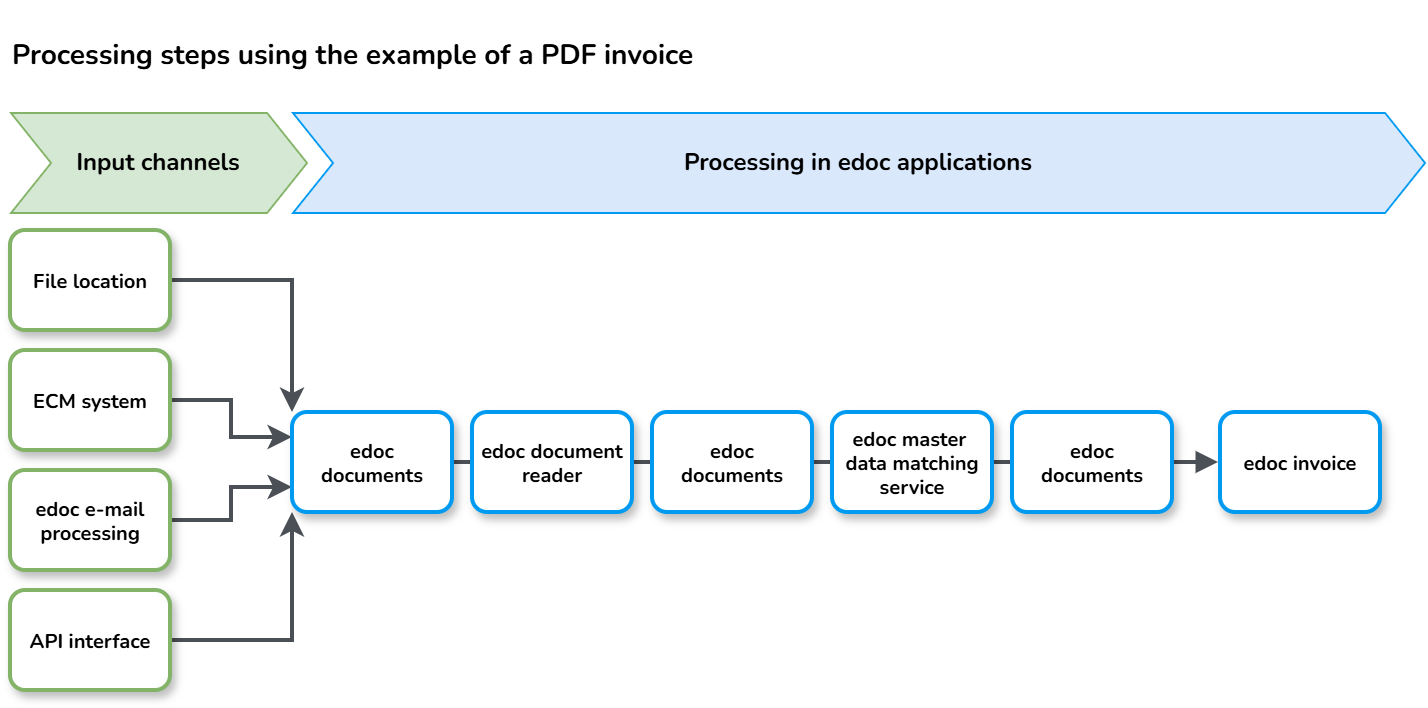
Incoming documents in variable format (starting point of the process)
You receive an invoice. The way and format (paper, PDF, ZUGFeRD, XRechnung, etc.) in which the invoice is received is irrelevant for edoc document reader. There are different input scenarios, such as scanning software, edoc e-mail processing, API interface or local file storage location.
Regardless of how you receive your documents or in which format they arrive, the edoc apps control the processing of the documents using schemas.
Virtual storage location for editing (edoc documents)
All digitized invoices are saved in edoc documents, regardless of the invoice's input channel. In edoc documents, you can configure a target schema to which the invoice is to be transferred. The edoc document reader target schema (Dokumenterkennung | Eingangsrechnung (document recognition | incoming invoice)) is selected by default. In the edoc document reader schema, enter the webhook to inform edoc document reader about new incoming documents. Select a target schema in the edoc document reader schema. By default, the schema for master data matching is used (Stammdatenabgleich | Eingangsrechnung (master data matching | incoming invoice)). You can also select a different target schema if you have previously created an individual target schema and want to adapt the process to your needs.
Recognition of the invoice (edoc document reader)
If you have configured the reading of the invoice by edoc document reader in edoc documents, the documents are transferred to the edoc documents schema for edoc document reader (Dokumenterkennung | Eingangsrechnung (document recognition | incoming invoice)). The Rechnungsformat (invoice format) field shows the format of the invoice. The recognition process differs depending on the invoice format.
-
Recognition of e-invoices: E-invoices are read directly and the invoice data is extracted. For ZUGFeRD invoices, the embedded XML invoice is extracted from the PDF file before the recognition process. The XML file can be opened as an additional document to the PDF file, e.g. in edoc invoice.
-
Recognition of PDF invoices: PDF invoices are analyzed with Azure Document Intelligence. The invoice data is recognized and extracted. The recognized data and the OCR data (Optical Character Recognition) are transferred to edoc document reader.
Virtual storage location after the recognition process (edoc documents)
Regardless of the invoice format, the recognized invoice data is saved in edoc documents. The Stammdatenabgleich | Eingangsrechnung (master data matching | incoming invoice) schema is used as the target schema by default, unless you have selected a target schema that is individually adapted to your needs.
Master data matching in edoc master data matching service
The recognized and extracted invoice properties are matched and linked with the master data in edoc master data matching service.
Virtual storage location after master data matching (edoc documents)
By default, the target schema Eingangsrechnung | aktiv (incoming invoice | active) is configured in edoc documents. The invoices are therefore prepared for the workflow in edoc invoice.
Workflow in edoc invoice
The invoices in the Eingangsrechnung | aktiv (incoming invoice | active) schema are ready for the verification process (approval). The recognized invoice properties are displayed and assigned in the invoice capture form in edoc invoice. This makes it easier for your users to verify invoices.
Find out more