
|
Component |
d.3 admin |
|---|---|
|
Version |
Current 2023.Q1, Annual 2022 |
|
Created on |
|
|
Last modified on |
No Workflow Applied |
|
Review status |
No Workflow Applied |
|
KB article number |
424182192 |
Summary
You want to delete a d.3 user in your d.3 repository. However, the d.3 user is not deleted.
The following error message is displayed in the d.3 log:
An object update affected more rows than it should!
Return code: 99996 (D3_SERVER_UNKNOWN_STD_EXCEPTION)
The d.3 user does not have a valid object ID in the Microsoft SQL Server database. You must first delete the d.3 user in the SQL Server database and then in d.3 admin.
Important requirements
-
You have administrative access to the d.3 server with d.3 admin and d.3 process manager.
-
You are a database administrator in Microsoft SQL Server with the permissions to execute write SQL statements.
-
Make a backup of the SQL Server database in advance, but at least for the database table sid_assign.
Solution
After you have backed up the SQL Server database or at least the database table sid_assign, proceed as follows:
-
Go to the d.3 server with d.3 process manager (http://localhost:3480) and stop the processes.
-
Log in to the d.3 database and establish a connection, e.g. in Microsoft SQL Server Studio.
-
Execute a SELECT statement with the user ID of the user to be deleted. By default, the parameter object_id should be NULL for all users (auth_id) as a query result.
SQLSELECT * FROM sid_assign WHERE auth_id = '<user_shortname>'All records that are empty in the query under Results are incorrect. You must delete the incorrect data records (highlighted in color).
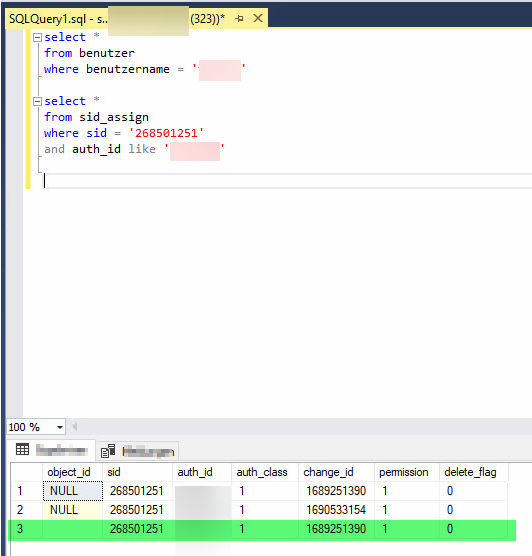
Empty entry for "object_id" for d.3 users -
Delete the incorrect user from the database table with the following SQL statement:
SQLDELETE FROM sid_assign WHERE auth_id = '<user_shortname>' AND object_id IS NOT NULL; -
Then empty the database table cache_state with a DELETE statement. Otherwise, the obsolete values will remain in the d.ecs jstore cache, which can lead to data inconsistencies:
SQLDELETE FROM cache_state -
Go to the d.3 server and start all processes in d.3 process manager (http://localhost:3480).
-
Delete the d.3 user in d.3 admin.