
|
Component |
edoc contract |
|---|---|
|
Version |
25.9.1–26.1.1 |
|
Created on |
|
|
Last modified on |
No Workflow Applied |
|
Review status |
No Workflow Applied |
|
KB article number |
1804894209 |
Summary
Find out how to find the edoc contract version number in this KB article. The version number is always required for support cases in order to process your request correctly and check compatibility.
Important requirements
-
Access to the administration of edoc contract.
Solution
You can find the version number of edoc contract in the app info in the administration view.
Here's how
-
Click on Administration in the 9-dot menu (app menu) in the edoc contract section.
-
Click on the i icon in the title bar.
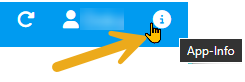
App info on the version -
Make a note of the app name and the app version in the App info dialog.
Please always pass this version number on to the support team together with your problem description.