
|
Component |
edoc invoice |
|---|---|
|
Version |
26.7.1 |
|
Created on |
|
|
Last modified on |
No Workflow Applied |
|
Review status |
No Workflow Applied |
|
KB article number |
2490531906 |
Summary
This Knowledge Base article describes the difference between a down payment invoice and an installment invoice, as well as how they are handled in edoc invoice. Generally, we distinguish between down payment invoices in the context of purchase order-related invoices. The same accounting logic applies to invoices without order reference.
Notice regarding liability and the completeness of the information
The information presented here has been prepared to the best of our knowledge and belief. It is intended solely to illustrate a possible approach and makes no claim to accuracy or completeness. The content does not constitute professional, tax, or legal advice.
The specific design and implementation of the processes described should always be reviewed on a case-by-case basis and coordinated with a tax advisor or certified public accountant. Only on this basis can it be ensured that the relevant legal, tax, and company-specific requirements are taken into account.
edoc solutions gmbh assumes no responsibility or liability whatsoever for the information provided with regard to its timeliness, accuracy, completeness, or suitability for a particular purpose. Use of the content is solely at the user’s own risk.
Important requirements
-
Access to edoc invoice with the permission to edit the header data of an invoice.
Process description for handling estimated invoices
An advance invoice is a partial invoice issued in advance for a service that has not yet been fully rendered at the time the invoice is issued. For this reason, the amount generally cannot yet be recognized directly as a final expense or revenue, but is first posted to an accrual account.
Posting to an accrual account serves to allocate revenue and expenses to the correct accounting period. In this specific case, the payment from the installment invoice is treated as an “advance payment.” From an economic perspective, this does not yet represent a completed business transaction, but rather an interim status in the service process.
Accrual account as an interim account for advance invoices
Typically, an entry is first made in which the payment is recorded as an expense or cost, but is simultaneously transferred to an accrual account. The accrual account serves as an interim account. The interim account indicates that the underlying service has not yet been fully rendered or consumed. Only upon actual service delivery or final invoicing is the amount transferred, either gradually or in full, from the accrual account to the corresponding expense or revenue accounts.
When an installment invoice (down payment) is canceled, a corresponding offsetting entry is required. The payment that was previously recorded is corrected by debiting the accrual account again and crediting the original payment.
In this case as well, the principle of accrual accounting remains intact, since only an interim balance that has already been posted is reversed.
In a nutshell
The accrual account serves to decouple payments and services in time and ensure their proper allocation to the respective periods. However, the specific structure of the journal entry depends on your internal accounting policies and the applicable legal requirements. The final assessment and implementation must therefore always be carried out by the responsible accounting department.
Solution
The solution is based on a sample invoice that is typical for a down payment invoice in Germany. This invoice, which is not linked to an order, is verified in edoc invoice and then forwarded to the accounting department.
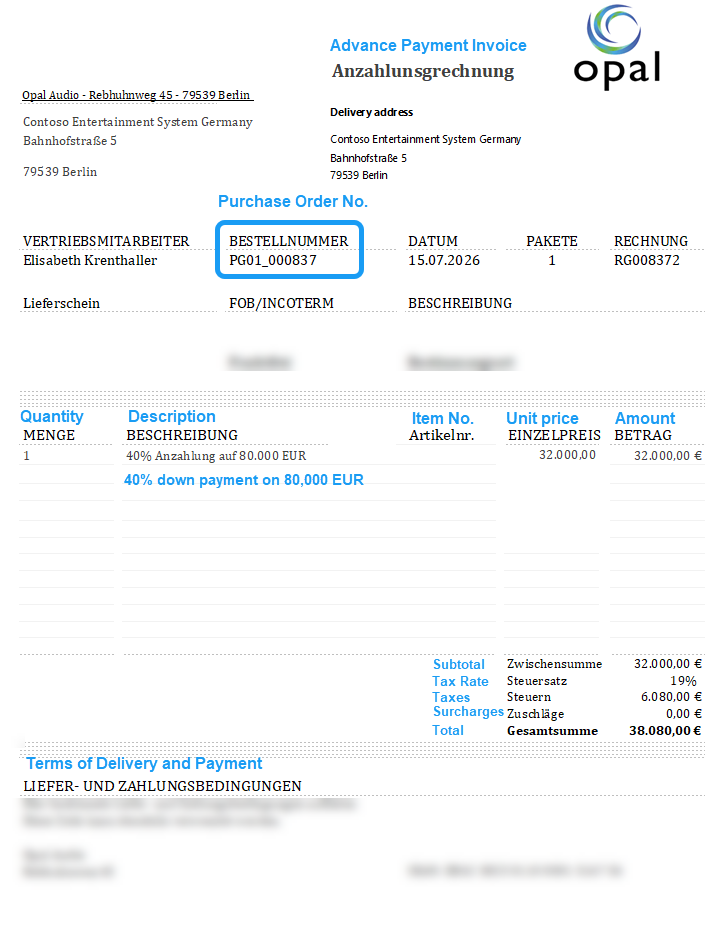
In edoc invoice, the down payment invoice is entered as an invoice without purchase order reference.
If an order number is recognized on the invoice and has already been entered in the edoc invoice entry form, you, as the invoice reviewer, must remove the order number from the capture form.
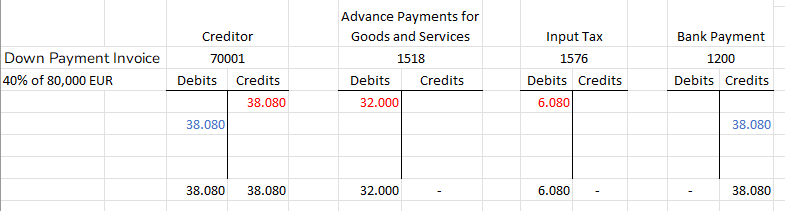
Example: Calculating the posting of an advance payment invoice to an accrual account
The down payment is usually posted to an accrual account. To post the down payment, the down payment invoice is entered as follows:
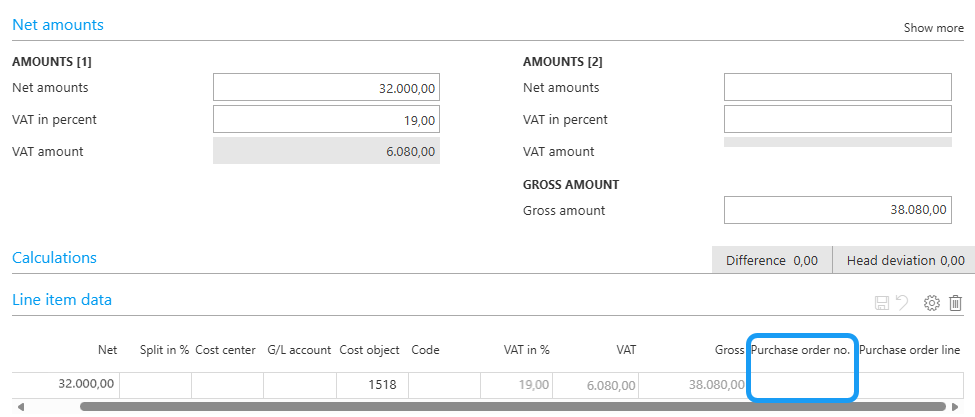
Step in edoc invoice: Remove purchase order number
In edoc invoice, you must remove the purchase order number from the header data in the entry form if the purchase order number was recognized and entered in the header data. Only then can you enter the invoice as an invoice without order reference.
To remove the purchase order number, click Purchase order numbers in the ribbon and delete the purchase order number in the dialog box.
Example: Calculating a cancellation or credit memo for the down payment invoice
Generally, advance payment invoices are canceled, credited, or offset against the final invoice. However, there is no universally applicable or correct procedure.
In this example, we assume that advance payment invoices are canceled.
In practice, your conventions, rules, and processes are key. In addition, advance payment invoices may vary depending on the transaction or ERP system.
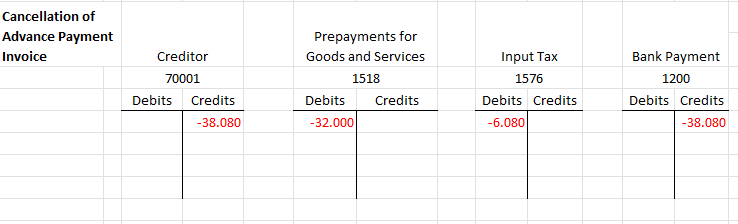
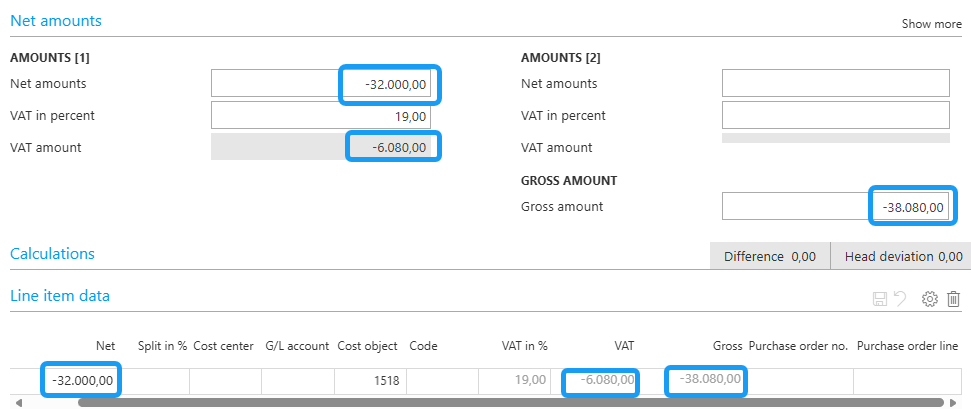
Step in edoc invoice: Enter negative amounts for a canceled invoice
If the down payment invoice has been canceled, enter the canceled invoice with negative amounts.
What is the difference between a credit and a canceled invoice?
Credit memo: A credit memo corrects or reduces an invoice amount, e.g., due to a discount, a return, or a refund.
Cancellation: A cancellation completely voids an invoice that has already been created and reverses the original transaction for accounting purposes.
Example: Posting the final invoice using open-item clearing
The final invoice generally covers the entire purchase order or service and indicates any advance payments made. The final invoice should always be considered a total invoice, with advance payments either offset against the total or taken into account upon payment, thereby reducing the remaining balance.
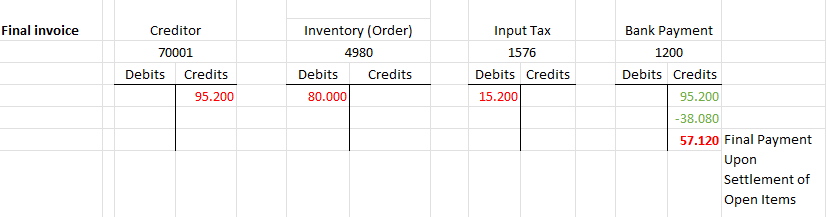
Step in edoc invoice: Review and finalize the final invoice as an invoice with order reference
When you receive a final invoice, assign the purchase order lines accordingly in edoc invoice, check the figures and any open items, and complete the workflow.
When the workflow is completed, the data in the ERP system is reconciled with the open items in the ERP system's payment processing.