
|
Component |
d.velop documents, d.3 server |
|---|---|
|
Version |
Annual 2022 - 2025 |
|
Created on |
|
|
Last modified on |
No Workflow Applied |
|
Review status |
No Workflow Applied |
|
KB article number |
1499267172 |
Summary
There are various use cases in which it is necessary to determine the server version of d.velop documents (on-premises).
The simplest method is to check the version of d.3 server on the application server in d.3 process manager. Alternatively, you can also display the version in the login dialog in the classic desktop client d.3 smart explorer.
In connection with the on-premises version, you also need to know the software feed.
Learn in this KB article how to find the version of d.velop documents and which d.velop documents version belongs to which feed (channel) in d.velop software manager.
Important requirements
-
Access to the application server on which d.velop documents is installed and a supported web browser in the current version.
-
If you do not have access to the d.3 application server: Access to d.3 smart explorer with active login to d.velop documents (red icon in the info area (system tray)).
Solution
You have two options to determine the d.velop documents version.
Option 1: Determine version in d.3 process manager
-
Connect to the d.3 application server via Remote Desktop Connection (RDP).
-
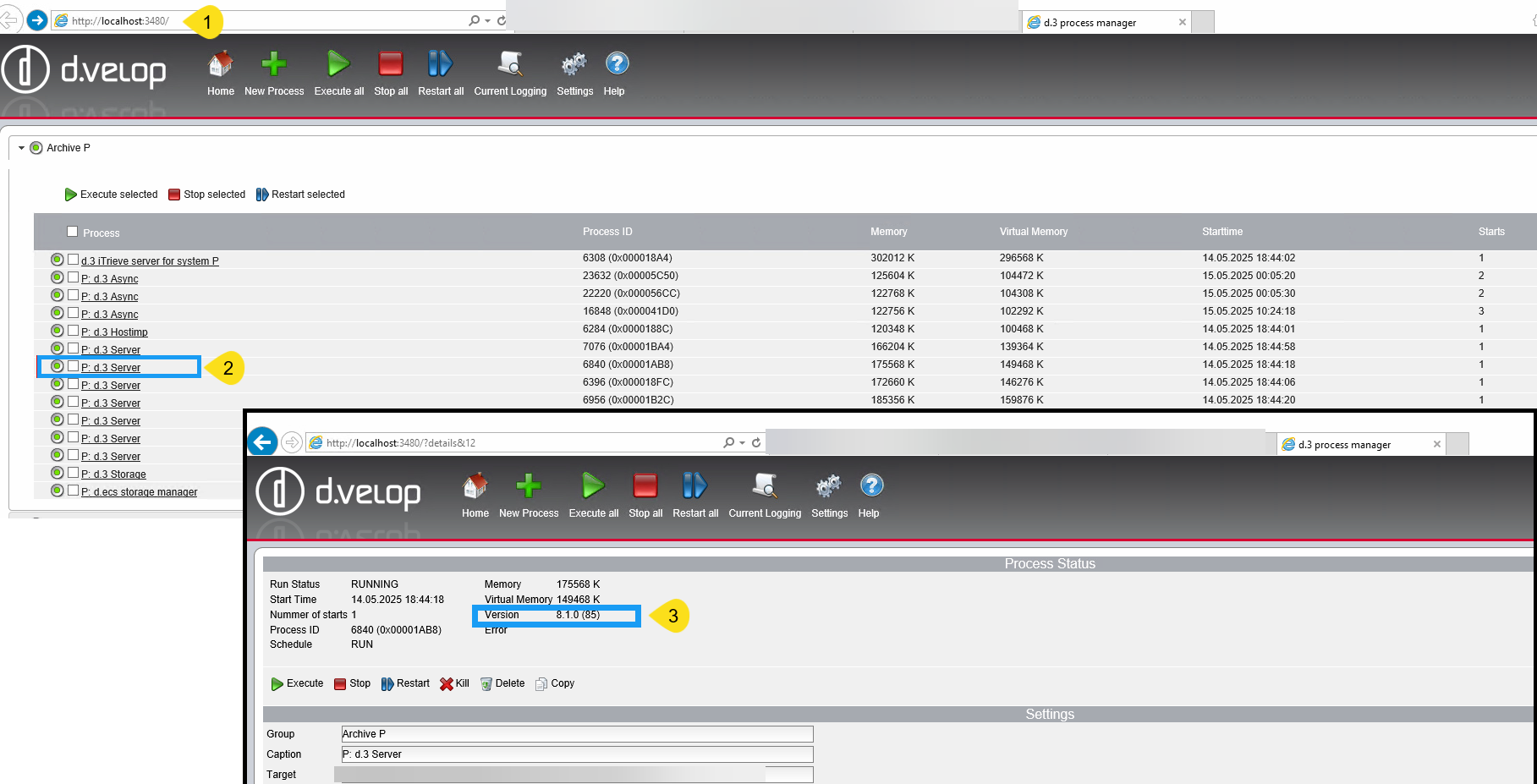
Open a current browser and call up one of the two URLs:
-
http://d-velop.local:3480/ and switch to the process manager tab.
-
http://localhost:3480/
-
-
Open the category for any repository (archive) (e.g. Archive P).
-
Click on a server process, e.g. d.3 Server.
The version number is displayed in the upper section of the server process.
Option 2: Determine version in d.3 smart explorer
If you do not have access to the d.3 application server, you can determine the version in d.3 login manager (login dialog in d.3 smart explorer).
-
Log in to d.3 smart explorer (d.velop documents desktop) so that the icon in the system tray of Microsoft Windows is no longer gray, but red. Your administrator may also have configured different colors.
-
Right-click on the d.3 smart explorer icon and then on Info.
You will find the server version in the Server section of the info dialog.
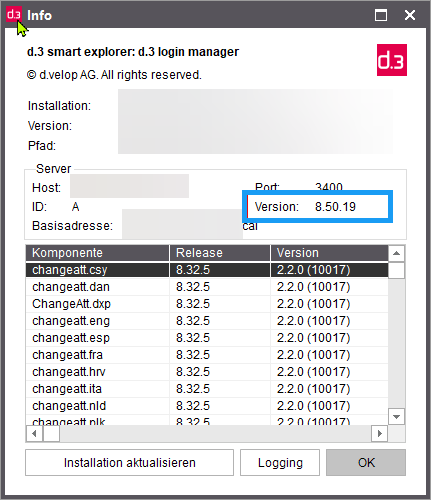
The version is only displayed if you are logged into d.3 smart explorer.
Overview of the versions and the associated feeds in d.velop software manager
|
Version |
Feed |
|---|---|
|
8.55.x (as of 8.55.12) |
Annual 2025 |
|
8.55.25 |
Annual 2025 Patch 8 (relevant for DV-SEC-2026-02, registration required) |
|
8.55.22 |
Annual 2025 Patch 6 (relevant for DV-SEC-2026-01, registration required) |
|
8.44.11 |
Current 2025 Q3 Patch 3 (relevant for DV-SEC-2026-01, registration required) |
|
8.66.x |
Current 2025.Q4 |
|
8.64.x |
Current 2025.Q3 |
|
8.60.x |
Current 2025.Q2 |
|
8.55.6 to 8.55.11 |
Current 2025.Q1 |
|
8.52.x |
Current 2024.Q4 |
|
8.50.x |
Current 2024.Q3 |
|
8.29.x - 8.42.x |
Current 2023 |
|
8.32.x |
Current 2022 |
|
8.45.x |
Annual 2024 |
|
8.21.x |
Annual 2022 |
|
8.1.0.x |
Legacy and non-channel |
If you have any questions, please get in touch with your contact at edoc.