
All actions in edoc automate are independent plug-ins. You can add your own new actions at any time.
Two types of actions are defined in edoc automate:
-
Actions that are supplied by default in edoc automate app.
-
Actions that you as an app developer can add to edoc automate yourself. You can only use your own actions in edoc automate.
Both action types are equivalent, they only differ in the namespace used and the storage location in the app.
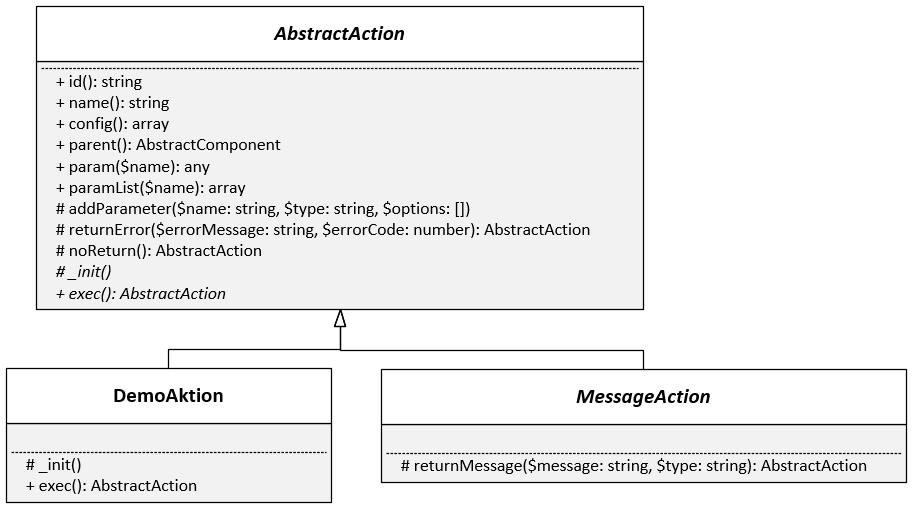
Class diagram for actions
"ActionHelper" help functions
The $helper property in the action class provides you with additional helpful methods.
class ActionHelper
{
    const ACTION_RETURN_TYPE_EMPTY = 'empty';
    const ACTION_RETURN_TYPE_VALUE = 'value';
    const ACTION_RETURN_TYPE_DATASET = 'dataset';

    /**
     * @param string $actionName The name of action including the group, "group\action".
     * @param array $params An array with the parameters of the action.
     * @param $returnFields An array with IDs for components, e.g. for the actions "default\SetValue" or "default\SetDataset".
     * @param $returnType The return type of called action (see constants ACTION_RETURN_TYPE_...).
     * @return The return of action. Can be a simple value or a dataset.
     */
    public function exec(string $actionName, array $params, ?array $returnFields = null, &$returnType = null);

    /**
     * @param $value The value to validate.
     * @return true, if the value is "SingleValue", otherwise "false".
     */
    public function isSingleValue($value): bool

    /**
     * @param $value The value to validate.
     * @return true, if the value is a dataset, otherwise "false".
     */
    public function isDataset($value): bool
}
Standard for namespaces
-
You can find the default actions under:
namespace edoc\appserver\app\actions\lib\app; -
You can save your own plug-ins under:
namespace edoc\appserver\app\actions\plugins;
Add your own app actions
If you want to outsource certain functions in your own actions, you must create a new plug-in in the app folder ../<app>/plugins/actions/ via WebDAV, for example.
Here's how
-
Create a new folder in the ../<app>/plugins/actions/ folder (e.g.: Replace). The name of the folder must reflect the name of the action.
-
Create a file in the folder with the same name and the extension .php (e.g.: Replace.php).
-
Open the file with any text editor.
-
Add the following content to the file:
PHP<?php namespace edoc\appserver\app\actions\plugins; use edoc\appserver\app\AbstractAction; use edoc\appserver\app\actions\SingleValueAction; class Replace extends AbstractAction { use SingleValueAction; protected function init() { $this->addParameter('String', self::ACTION_TYPE_TEXT); $this->addParameter('Search', self::ACTION_TYPE_TEXT); $this->addParameter('Replace', self::ACTION_TYPE_TEXT); } public function exec(): AbstractAction { $string = $this->param('String'); $search = $this->param('Search'); $replace = $this->param('Replace'); $value = str_replace($search, $replace, $string); return $this->returnSingleValue($value); } } -
Save the file with the correct encoding: UTF-8 without BOM.
You can now use the newly created action in the edoc automate editor.
You may need to reload edoc automate to use the action.
Types for parameters
All types that can be used for the parameters of actions are listed and described in the following article.
Overview of the parameter types for actions in edoc automate
Traits: The PHP method for reusing code
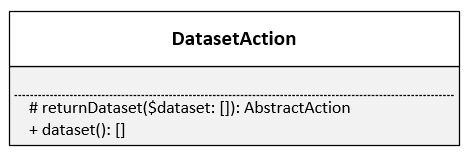
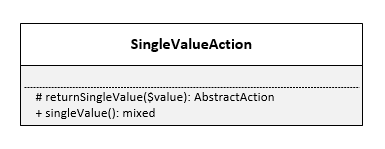
edoc automate uses traits to control whether an action returns data and which data format is returned.
You can use the following traits:
-
"DatasetAction" trait
-
"SingleValueAction" trait
Example: Use a data source
	<?php

	use edoc\appserver\app\AbstractAction;
	use edoc\appserver\app\actions\SingleValueAction;
	use edoc\appserver\datasources\Database;
	use edoc\appserver\datasources\DataSource;

	class DatasourceAction extends AbstractAction
	{
		use SingleValueAction;

		protected function init()
		{
			// define datasource parameter
			$this->addParameter("DS", self::ACTION_TYPE_DATASOURCE);

			$this->addParemeter("Search", self::ACTION_TYPE_TEXT);

		}

		public function exec(): AbstractAction
		{
			$selectedDatasource = $this->param("DS");

			try {
				// get datasource instance
				$ds = DataSource::getInstance($selectedDatasource);

				// validate datasource instance
				if ($ds instanceof Database) {
					// set query parameter
					$ds->setParams([
						"search" => $this->param('Search')
					]);
					$query = "SELECT `title` FROM `data` WHERE `value` = :search";
					// execute query
					$result = $ds->query($query);

					if (is_array($result) && count($result) !== 0) {
						$this->returnSingleValue($result[0]['title']);
					}
				} else {
					$this->returnError('cannot create instance of datasource "' . $selectedDatasource . '"');
				}
			} catch (\Exception $e) {
				$this->returnError($e->getMessage(), $e->getCode());
			}
		}
	}
Example: Execute actions
<?php

	use edoc\appserver\app\AbstractAction;
	use edoc\appserver\app\actions\SingleValueAction;

	class ExecAction extends AbstractAction
	{
		use SingleValueAction;

		protected function init()
		{
			$this->addParameter('action', self::ACTION_TYPE_ACTION);
		}

		protected function exec(): AbstractAction
		{
			$actionConfig = $this->param('action');
			if (is_array($actions)) {
				// create action instance
				$action = AbstractAction::create($actionConfig, $this->parent(), $this->logger);
				if ($action instanceof AbstractAction) {
						try {
							// set options
							$action->setRenderResponse($this->renderResponse());

							// exec action
							$action->run();

							// validate result
              $uses = class_uses($action);
							if (isset($uses[SingleValueAction::class]) && $action->isSingleValueSet()) {
								return $this->returnSingleValueAction($action->singleValue());
							} else {
								// trigger warning/error, invalue action result!
							}
						} catch (\Exception $e) {
								// trigger warning/error, while exec action!
						}
				} else {
								// trigger warning/error, invalid action definition!
				}

			}

			return $this->returnEnd();
		}
	}
You can also call other actions independently of parameters by using ActionHelper. Example: $response = $this->helper->exec("app\\GetConstant", ["Name" => "APP_NAME"]);